

HPE DL560 Gen8 Drive Cages & Backplanes
Browse available HPE DL560 Gen8 Drive Cages & Backplanes. Select a specific configuration from the products below. Each child SKU retains its own technical details, compatibility information, condition, and inventory handling.
Product images
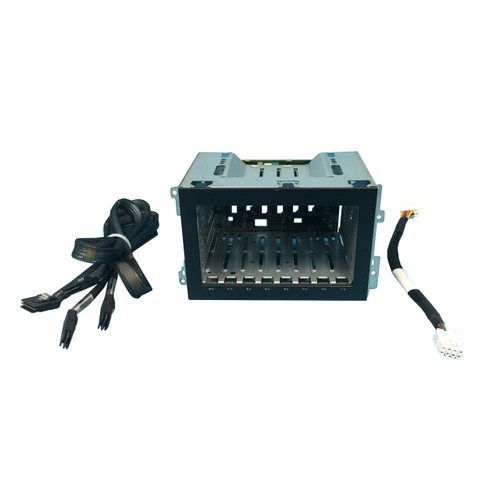
Contact CBS for product specifications.
Available inventory
| Inventory type | SKU | In stock |
|---|
Stock updated 2026-11-09. Availability is confirmed with your quote; requested quantities do not reserve stock.
Questions & Answers
Related questions
Helpful answers for the product or service you are exploring.
How are the 48 DIMM slots arranged in DL560 Gen8?
HPE ProLiant DL Servers
HPE documents 12 slots per processor, four memory channels per processor and three DIMMs per channel. Only slots belonging to installed processors can be used. Keep RDIMM and LRDIMM configurations separate and calculate capacity from the qualified modules and actual CPU count.
Documented options in the CBS catalog: 647901-B21. Confirm the complete configuration and included kit contents before ordering.
Related server: HPE DL560 Gen8 E5-4603 2P 16Gb 8 SFF (Renew).
Browse server memory. Match the exact platform and option number before selecting a part.
HPE DL560 GEN8 documentation · Reviewed
Do DL560 Gen8 and BL660c Gen8 use the same processor upgrade family as DL380p Gen8?
HPE ProLiant DL Servers · HPE ProLiant BL Servers
HPE’s upgrade advisory separates E5-4600-to-v2 upgrades from E5-2600 and E5-2400 upgrades. Select the procedure and option kit for the exact platform. Confirm the complete installed CPU configuration and required firmware rather than buying a similarly named Xeon E5.
HPE product documentation · Reviewed
Can a Gen8 server use DDR4 memory from a Gen9 server?
Servers
No. The Gen8 platforms in HPE’s DDR3 architecture guide use a different memory generation. Check the exact Gen8 model, DIMM technology and qualified population. Memory from a newer generation is not a supported shortcut for increasing capacity.
HPE product documentation · Reviewed
Why must some Gen8 systems be updated before installing an E5 v2 CPU?
Processors
HPE publishes an upgrade sequence for specified Gen8 platforms moving from supported E5 processors to their v2 successors. Complete the applicable firmware preparation with the original CPU installed; verify that the exact server is included in the advisory.
Browse server processors. Send the server product number and installed part label to CBS for a configuration-specific match.
HPE Gen8 E5 v2 upgrade advisory · Reviewed
How do I choose the right storage approach?
Storage
Start with usable capacity, application workload, performance and recovery requirements. Include current servers, connections and expected growth. Compare complete configurations, including controllers, drives, enclosures and support, rather than raw drive capacity alone.